
SuiteScript 2.0 vs. 2.1: Key Differences for NetSuite Developers
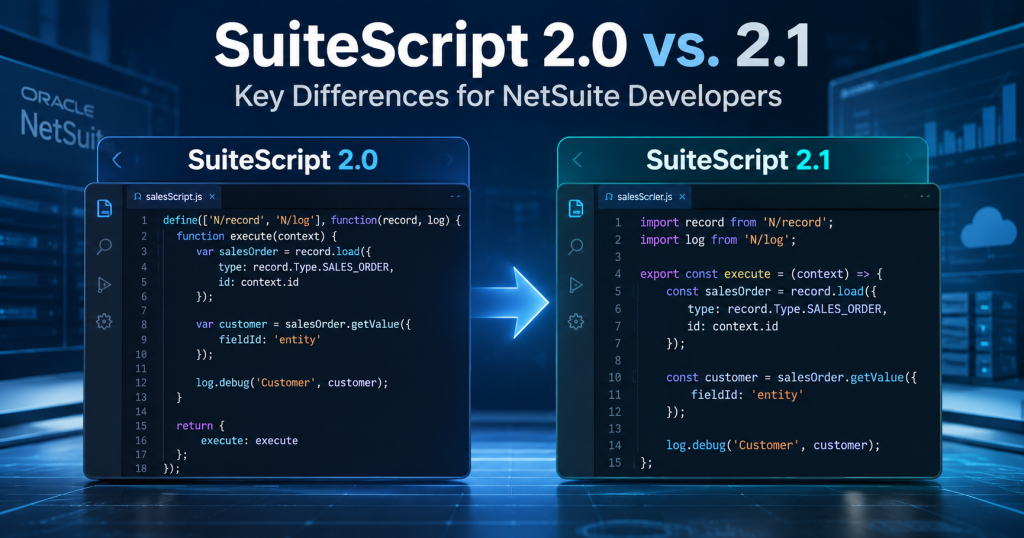
When evaluating SuiteScript 2.0 vs 2.1, the decisive difference is not an entirely new NetSuite API. It is the JavaScript runtime, language capabilities, and behavior your customizations encounter during execution. That distinction matters to developers who support finance, fulfillment, integrations, and user-facing workflows.
Oracle has named SuiteScript 2.1 the standard scripting model in NetSuite 2026.2 and plans to require it for new and existing scripts by 2028.2. Teams should therefore understand the technical differences well before changes reach production.
SuiteScript 2.0 vs 2.1 at a Glance
|
Area |
SuiteScript 2.0 |
SuiteScript 2.1 |
|
JavaScript execution |
Older runtime engine |
Newer GraalVM-based runtime |
|
Language features |
Older JavaScript syntax subset |
Modern features including let/const, arrow functions and spread |
|
NetSuite APIs |
SuiteScript 2.x modules |
Broadly the same SuiteScript API functionality |
|
Debugger |
SuiteScript Debugger |
Browser debugger for 2.1 scripts |
|
Server-side promises |
Earlier behavior and availability |
Additional supported asynchronous capabilities in eligible contexts |
|
Version annotation |
@NApiVersion 2.0 |
@NApiVersion 2.1 |
|
Testing question |
Does existing behavior match expectations? |
Does behavior remain correct in 2.1 runtime? |
This is a functional comparison, not a promise that every script type, module or JavaScript method behaves identically. Always consult Oracle guidance for your exact execution context.
1. Runtime Engine: The Most Important Difference
SuiteScript 2.1 runs on a newer JavaScript engine (GraalVM), while SuiteScript 2.0 uses an older engine. Changing engines can affect how edge cases are interpreted even if developers do not rewrite business logic. For example, Oracle documents differences involving error objects, JSON parsing, strict-mode rules, date conversion, RESTlet return handling and parseInt.
Consider a finance script that reads invoice values from a partner payload. If one runtime accepts malformed input that another rejects, the business consequence may be a failed import rather than a visible syntax error. A practical comparison therefore asks whether inputs, outputs and exception handling remain consistent—not merely whether the file executes.
2. JavaScript Features and Developer Productivity
SuiteScript 2.1 supports modern ECMAScript language features that help developers express intent more clearly. let and const provide block-scoped declarations; arrow functions reduce callback boilerplate; spread syntax helps work with arrays and objects. Destructuring and classes can also improve organization where appropriate.
// Illustrative syntax difference
// 2.0-style declaration
var approved = records.filter(function (r) { return r.total > 1000; });
// 2.1 language syntax
const approved = records.filter(r => r.total > 1000);
The two snippets express the same illustrative filtering rule; this is not proof that upgrading a live script is as simple as changing var to const. Modern syntax improves readability when developers apply consistent standards, tests and supported API usage.
3. async/await and Promise Behavior
SuiteScript 2.1 supports async/await syntax and additional asynchronous server-side capabilities in documented contexts. However, async/await does not automatically make every N/ module API asynchronous, nor can a developer assume any arbitrary promise-based operation is supported in every script type. Consult Oracle’s module-specific and script-context documentation.
For developers, the distinction changes code review: examine exactly which functions return supported promises, the execution context, and how errors propagate. Treat async behavior as an implementation-specific capability, not a universal drop-in replacement for synchronous NetSuite calls.
4. NetSuite API Functionality: What Has Not Changed
Oracle states that the SuiteScript API functionality is the same between SuiteScript 2.0 and 2.1. Both use modular N/ APIs and script entry points. The developer challenge is generally not to relearn records, searches and governance from scratch; it is to validate behavior under the newer engine and use documented features correctly.
For a purchasing approval workflow, the underlying business rule—route transactions above a threshold to an approver—should remain the benchmark. Whether a modernization improves implementation style is secondary to preserving the correct approver, audit trail and exception outcome.
5. Compatibility: Where Identical-Looking Code Can Differ
Oracle’s differences documentation identifies specific edge cases: reserved words used as identifiers, strict mode, error object properties, invalid JSON parsing, toSource usage, conditional catch blocks, number formatting, and RESTlet string/return behavior. These are useful review targets when a previously stable script produces a different output.
A RESTlet serving a warehouse connector illustrates why this matters. The business integration might expect a particular string representation or response shape. The response should be regression-tested against a saved request/response contract, rather than assuming that “successful execution” means downstream compatibility.
6. Debugging and Testing Experience
Oracle describes SuiteScript 2.1 debugging through the browser debugger rather than the SuiteScript Debugger used for SuiteScript 2.0. Teams that maintain runbooks, onboarding instructions and escalation paths should update the workflow their developers actually follow.
For eligible SuiteScript 2.0 and 2.x server scripts, Oracle provides account-level preferences for testing execution on the 2.1 runtime without immediately changing the source annotation. The preference does not make a 2.0-annotated file accept 2.1-only syntax at upload. This distinction helps teams separate runtime comparison from syntax modernization.
7. How Developers Should Interpret the Differences
- Compare observable business outcomes: saved records, calculated amounts, generated files, integration responses and error-handling behavior.
- Review the actual version annotation and runtime execution settings, not only the script’s filename or code style.
- Use realistic edge-case data: empty values, malformed JSON, dates, zero-padded numbers and upstream API failures.
- Retain a regression baseline so a small engine difference can be linked to a specific downstream impact.
Frequently Asked Questions
Is SuiteScript 2.1 simply SuiteScript 2.0 with newer syntax?
No. Alongside newer language features, the underlying runtime differs, and Oracle documents behavioral differences relevant to compatibility.
Do NetSuite APIs need to be completely rewritten for 2.1?
Not typically for 2.0 to 2.1: Oracle says API functionality is the same. Specific scripts may still need code changes after runtime testing. The move from 1.0 is a different, more extensive conversion path.
Can a SuiteScript 2.0 server script be tested on the 2.1 runtime?
Oracle provides account-level testing preferences for eligible 2.0 and 2.x server scripts; verify eligibility and runtime settings in the relevant account.
Conclusion: Compare Behavior Before You Compare Syntax
The practical lesson from SuiteScript 2.0 vs 2.1 is that modernization and functional compatibility must be evaluated together. The JavaScript language is more capable, but an unchanged business outcome remains the real success criterion. The companion migration guide explains execution steps; the challenges article examines failure scenarios in depth.
Talk to Tech i-Vin Technologies: Need a second opinion on the compatibility of your NetSuite customizations? Our consultants can review runtime-sensitive scripts, define business-focused test cases and flag the integrations that merit closer attention.