
How to Build a Scalable Integration Between Salesforce, NetSuite & Celigo
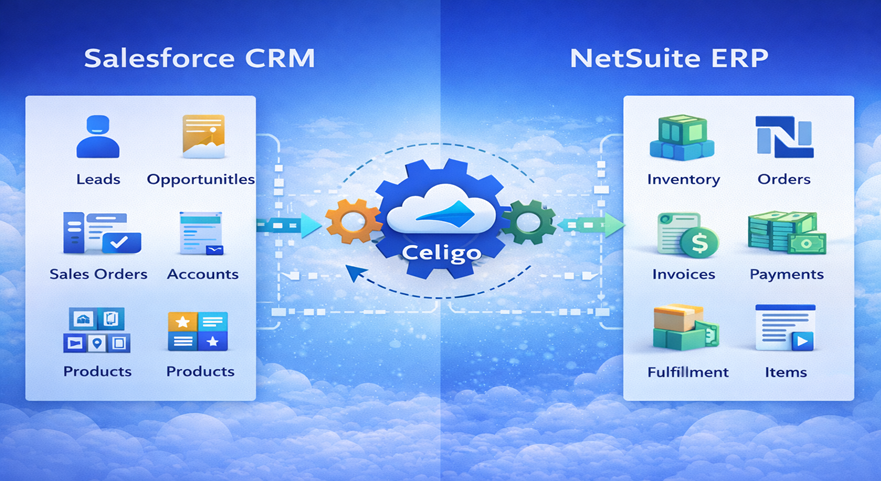
A growing business needs systems that work together smoothly—especially when sales, finance, inventory, and customer service are handled in different platforms. A well-planned Salesforce NetSuite Celigo Integration helps you sync customer, order, invoice, and fulfillment data without delays or errors. This integration doesn’t just connect systems—it builds a foundation for automation, real-time decision making, and operational scalability. With the right design principles, you can reduce manual work, improve data accuracy, and ensure your integration continues to perform even when transaction volume increases.
Why Integrate Salesforce, NetSuite & Celigo?
Salesforce is usually the customer-facing engine (CRM + sales pipeline). NetSuite handles back-office operations like finance, order processing, inventory, and billing. Celigo acts as the modern iPaaS (Integration Platform as a Service) layer that connects them with prebuilt connectors, APIs, and automation flows.
A scalable integration ensures:
- Data stays consistent across platforms
- Orders flow automatically from CRM to ERP
- Billing and fulfillment updates reflect back in CRM
- Sales teams get real-time order and payment status
This is why Salesforce NetSuite Celigo Integration is considered one of the strongest enterprise automation combinations.
Common Business Processes to Automate
Below are real use cases where Salesforce NetSuite Celigo Integration brings maximum impact:
Lead-to-Cash Automation
- Lead → Opportunity → Order
- Order pushed to NetSuite automatically
- Invoice creation + payment status tracking
- Customer lifecycle visibility in Salesforce
Order Management Sync
- Sales order sync from Salesforce
- Fulfillment updates from NetSuite
- Shipment + tracking updates sent back to Salesforce
Customer Master Data Sync
- Customer creation and updates across systems
- Duplicate prevention with rules + mapping
- Clean “single source of truth”
Integration Architecture – The Scalable Approach
A scalable Salesforce NetSuite Celigo Integration is not just “connect and sync”—it requires a clear architecture.
1) Define the Source of Truth
Choose which platform will own each data type:
- Customer master → often NetSuite
- Leads/opportunities → Salesforce
- Inventory → NetSuite
- Order pipeline → Salesforce
This avoids conflicts and wrong overwrites.
2) Use Celigo as the Orchestration Layer
Celigo should act as:
- data mapping layer
- API orchestration layer
- error handling hub
- monitoring dashboard
Instead of point-to-point sync (which breaks at scale), orchestration enables long-term stability.
3) Build Event-based Flows (Not Bulk Dumps)
A scalable integration triggers processes based on events:
- order created
- invoice generated
- fulfillment shipped
- payment received
This improves speed and reduces load issues in Salesforce NetSuite Celigo Integration.
Step-by-Step: How to Build Salesforce + NetSuite Integration Using Celigo
Here is a practical roadmap:
✅ Step 1: Integration Discovery & Data Mapping
Create mapping documents for:
- Accounts / Customers
- Contacts
- Products
- Pricebooks
- Orders
- Invoices
Also identify field types (text, date, currency) & validation rules.
✅ Step 2: Select Celigo Integration Apps / Custom Flows
Celigo offers prebuilt integration templates and also supports custom flows using APIs.
Best practice: use prebuilt where possible, customize only where needed.
Authority references:
Salesforce Integration Capabilities
✅ Step 3: Create Flow Design with Filters & Rules
Examples:
- only sync orders with status = “Closed Won”
- sync invoices only after NetSuite approval
- sync fulfillment only if tracking number exists
This avoids unnecessary sync noise and makes Salesforce NetSuite Celigo Integration scalable.
✅ Step 4: Error Handling & Retry Logic
You must plan for:
- API limits
- invalid data
- missing mandatory fields
- duplicates
Celigo supports:
- error dashboards
- automated retries
- manual reprocessing
✅ Step 5: Testing Strategy (Must!)
Test levels:
- Unit testing for mapping
- Integration testing for flows
- UAT with real business scenarios
- Volume testing (important for scalability)
A scalable Salesforce NetSuite Celigo Integration is incomplete without volume testing.
Best Practices to Keep Integration Scalable
Use Queue-based Processing
Instead of syncing everything instantly, queue transactions. This avoids API overload.
Reduce Payload Size
Sync only necessary fields. Avoid syncing huge objects unless needed.
Maintain Version Control for Mapping Logic
Maintain:
- mapping documents
- change logs
- deployment notes
Monitor Performance KPIs
Track:
- success rate %
- average sync time
- error frequency
- retry count
These metrics help long-term stability in Salesforce NetSuite Celigo Integration.
Security & Compliance Considerations
Integration handles sensitive customer and financial data, so implement:
- Role-based access controls (RBAC)
- Token-based authentication
- Encryption in transit
- Audit logs for integration runs
Also follow:
Salesforce Trust & Compliance
Common Challenges (and Fixes)
Here are typical issues in Salesforce NetSuite Celigo Integration:
- Duplicate customers → enforce unique identifier logic
- Mismatch in product IDs → align SKU + item mapping
- Tax or currency conflicts → define conversion rules
- NetSuite approval dependencies → use status-based syncing
- API rate limits → use throttling + schedule sync
Conclusion
A well-planned Salesforce NetSuite Celigo Integration is not only about connecting systems—it is about creating a stable, scalable, and future-ready digital backbone for your business. When Salesforce and NetSuite exchange accurate data through Celigo, businesses can automate lead-to-cash processes, reduce manual dependency, eliminate duplicate records, and ensure real-time visibility across departments. The key is to build the integration with the right architecture, clear data ownership rules, strong mapping, error handling, and continuous monitoring. When done correctly, Salesforce NetSuite Celigo Integration supports growth without performance issues, even as transaction volumes increase.
Planning to implement a scalable Salesforce NetSuite Celigo Integration for your business? Get expert support for integration architecture, Celigo flow setup, testing, automation, and long-term monitoring with Tech i-vin Technology. We help you build secure, reliable, and scalable integrations that improve operational efficiency and business performance.