
Data Archiving vs Data Backup: Key Differences Explained (2026 Guide)
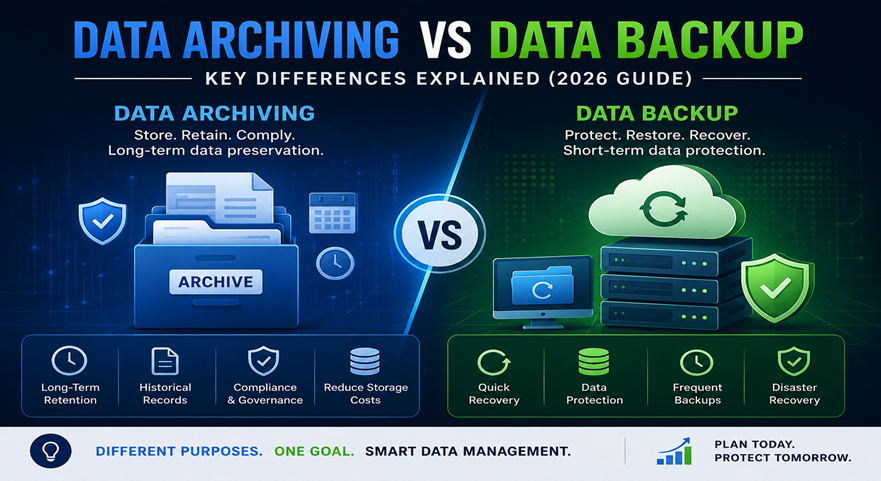
Businesses generate massive volumes of operational, financial, customer, and transactional data every day. Managing this growing information efficiently has become essential for performance, compliance, security, and long-term scalability. This is where Data Archiving vs Data Backup becomes an important topic for IT teams and business leaders.
Many organizations assume that backups and archives serve the same purpose. However, they are completely different data management strategies designed for separate business objectives. Understanding Data Archiving vs Data Backup helps businesses reduce storage costs, improve compliance, optimize ERP performance, and protect critical information effectively.
Whether a company uses ERP platforms, cloud applications, or enterprise databases, choosing the right approach between archiving and backup can significantly impact operational efficiency in 2026.
What is Data Archiving?
Data archiving is the process of moving inactive or historical data from primary production systems to long-term storage locations while keeping it accessible for future reference, audits, analytics, or compliance requirements.
Archived data is not frequently used in daily operations, but businesses may still need it occasionally. Archiving helps reduce database size, improve system speed, and lower infrastructure costs.
Key Characteristics of Data Archiving
- Stores inactive or historical records
- Optimizes database and ERP performance
- Supports regulatory compliance
- Reduces primary storage usage
- Enables long-term retention policies
- Keeps data searchable and retrievable
Businesses using ERP systems often implement archiving to maintain system efficiency as transaction volumes grow.
Recommended Resource
Learn more about enterprise data lifecycle management from IBM Data Archiving Guide.
What is Data Backup?
Data backup is the process of creating copies of active business data so it can be restored in case of accidental deletion, cyberattacks, hardware failure, corruption, or disaster recovery situations.
Backups focus on business continuity and operational recovery. Unlike archives, backup copies are typically used for short-term protection and fast restoration.
Understanding Data Archiving vs Data Backup is essential because backups are designed for recovery, while archives are designed for long-term retention.
Key Characteristics of Data Backup
- Creates duplicate copies of data
- Supports disaster recovery
- Protects against ransomware and cyber threats
- Enables quick restoration
- Preserves current operational data
- Usually maintained for shorter retention periods
Recommended Resource
Read backup best practices from Veeam Backup Solutions.
Data Archiving vs Data Backup: Core Difference
The primary difference between Data Archiving vs Data Backup lies in their purpose.
Feature | Data Archiving | Data Backup |
Purpose | Long-term retention | Disaster recovery |
Data Type | Inactive data | Active data |
Accessibility | Occasionally accessed | Frequently restored when needed |
Storage Goal | Reduce production load | Ensure business continuity |
Retention Period | Long-term | Short to medium-term |
Storage Cost | Lower over time | Higher for frequent copies |
Compliance Support | Strong | Limited |
Recovery Speed | Slower retrieval | Faster restoration |
This comparison clearly shows why businesses should not treat backup systems as archival solutions.
Why Businesses Need Both Archiving and Backup
A common mistake organizations make is relying only on backups for long-term storage. This approach increases storage costs and reduces operational efficiency.
A complete data strategy requires both solutions because Data Archiving vs Data Backup addresses different business needs.
Benefits of Using Both Strategies
1. Better System Performance
Archiving old records reduces database load and improves ERP speed.
2. Stronger Disaster Recovery
Backups ensure fast restoration during outages or cyber incidents.
3. Regulatory Compliance
Archived records support legal retention policies and audit requirements.
4. Lower Infrastructure Costs
Archiving inactive records minimizes expensive primary storage usage.
5. Improved Data Governance
Organizations can manage retention schedules more effectively.
Data Archiving vs Data Backup in ERP Systems
ERP platforms process large amounts of transactional information every day. Over time, this data growth can impact reporting speed, integrations, and overall performance.
Understanding Data Archiving vs Data Backup becomes especially important for ERP environments because these systems require both operational protection and long-term historical retention.
Common ERP Data That Businesses Archive
- Historical invoices
- Closed purchase orders
- Old payroll records
- Completed sales transactions
- Legacy customer records
- Financial audit documents
Common ERP Data That Businesses Backup
- Active financial data
- Current customer information
- Ongoing transactions
- Application configurations
- User permissions
- Real-time databases
Recommended Resource
Explore enterprise storage strategies from Amazon Web Services (AWS).
Compliance and Security Considerations
Data regulations continue to become stricter across industries in 2026. Organizations handling customer, healthcare, banking, or financial information must maintain proper retention and recovery policies.
This is another major reason why Data Archiving vs Data Backup is a critical business discussion.
Compliance Benefits of Data Archiving
- Maintains long-term historical records
- Supports legal discovery requests
- Simplifies audit preparation
- Helps meet industry retention regulations
- Reduces compliance risks
Security Benefits of Data Backup
- Protects against ransomware attacks
- Enables quick system restoration
- Prevents permanent data loss
- Supports disaster recovery planning
- Minimizes operational downtime
Recommended Resource
Read cybersecurity and backup guidance from CISA Cybersecurity Resources.
Cloud Storage and Modern Data Management Trends
Cloud adoption continues to transform enterprise data management strategies. Businesses are increasingly using hybrid cloud environments for both archiving and backup operations.
Modern cloud solutions improve scalability, automation, and accessibility while reducing infrastructure complexity.
Cloud-Based Archiving Benefits
- Scalable storage capacity
- Lower operational costs
- Automated retention management
- Improved accessibility
- Better analytics integration
Cloud-Based Backup Benefits
- Faster recovery options
- Remote disaster recovery
- Encrypted backup storage
- Automated scheduling
- Multi-region redundancy
Understanding Data Archiving vs Data Backup helps businesses choose the right cloud architecture for long-term growth.
Common Mistakes Businesses Make
Many organizations struggle with data management because they misunderstand Data Archiving vs Data Backup.
Mistake 1: Using Backup as an Archive
Backups are not optimized for long-term historical retention.
Mistake 2: Archiving Active Data
Moving active records into archive storage can slow operations.
Mistake 3: Ignoring Retention Policies
Lack of retention planning increases compliance risk.
Mistake 4: No Recovery Testing
Backup systems must be tested regularly.
Mistake 5: Manual Data Management
Automation improves consistency and reduces human error.
Best Practices for Data Archiving and Backup in 2026
Businesses should follow structured data governance strategies for better operational control.
Recommended Best Practices
- Define clear retention policies
- Separate active and inactive data
- Automate backup scheduling
- Encrypt sensitive records
- Test restoration processes regularly
- Use scalable cloud storage
- Monitor compliance requirements
- Archive legacy ERP records periodically
- Maintain multiple backup copies
- Implement role-based access controls
Organizations implementing these strategies gain better security, compliance, and performance optimization.
How to Decide Between Archiving and Backup
The answer is not choosing one over the other. Instead, businesses should understand how Data Archiving vs Data Backup works together.
Use Data Archiving When:
- Data is rarely accessed
- Long-term retention is required
- Storage optimization is needed
- Compliance regulations apply
- ERP performance is slowing down
Use Data Backup When:
- Fast recovery is critical
- Systems require disaster recovery
- Protection against cyber threats is needed
- Operational continuity matters
- Current data must remain protected
A balanced strategy delivers stronger operational resilience.
Future of Data Management in 2026
Artificial intelligence, automation, and predictive analytics are changing how organizations manage enterprise information.
Modern businesses are increasingly integrating:
- AI-powered data classification
- Automated retention scheduling
- Intelligent storage optimization
- Predictive backup monitoring
- Cloud-native disaster recovery
- Compliance automation tools
As data volumes continue to rise, understanding Data Archiving vs Data Backup will become even more important for scalable business growth.
Conclusion
Understanding Data Archiving vs Data Backup is essential for businesses aiming to improve storage efficiency, maintain compliance, strengthen cybersecurity, and optimize enterprise system performance.
While backups protect operational continuity and disaster recovery, archiving focuses on long-term retention and performance optimization. Organizations that combine both strategies can reduce infrastructure costs, improve governance, and scale their systems more effectively.
Businesses preparing for digital growth in 2026 should implement structured archiving and backup frameworks to ensure long-term operational success.
Looking to improve ERP performance, manage growing enterprise data, or implement secure archiving and backup solutions?
Tech i-vin Technology helps businesses streamline ERP systems, optimize data management strategies, and improve operational efficiency with modern enterprise solutions.